Run WordPress Project Management Without Bloat: Agency Guide
As an agency owner, your tech stack is likely eating into your profit margins. Between active seats on Asana or ClickUp, separate time-tracking tools, and dedicated client portal software, the monthly SaaS bill can quickly spiral out of control.
But the financial cost is only half the problem. The real killer is the "context-switching tax." Your developers, designers, and copywriters spend their days working inside WordPress, yet they have to jump to external platforms to update task statuses, log hours, and read client feedback. Meanwhile, your clients are forced to log into yet another unfamiliar dashboard just to approve a simple mockup.
To solve this, many agency owners look to consolidate their operations by moving their project management directly into their existing WordPress ecosystem. However, a common fear holds them back: site bloat.
Will installing a project management plugin slow down your agency's primary marketing site? Will it clutter your database and ruin your Core Web Vitals?
The short answer is: not if you choose the right architecture.
This guide explores how to run a high-performance, secure, and completely unbloated project management system directly inside WordPress.
The Case for Keeping Project Management Inside Your WordPress Ecosystem
For a growing agency, consolidating your tools inside WordPress offers three massive operational advantages:
1. Eliminating the "SaaS Tax"
Most modern project management tools charge per-user, per-month pricing. As your agency scales—adding freelancers, full-time staff, and clients—your software expenses grow exponentially. By hosting your project management on your own WordPress server, you pay a flat fee for the software, unlocking unlimited users, projects, and tasks without the financial penalty of scaling your team.
2. A Seamless, White-Labeled Client Experience
Instead of sending clients to a third-party domain (e.g., youragency.asana.com), you can invite them to a fully branded portal on your own domain (e.g., portal.youragency.com). This builds brand authority, keeps clients focused on your ecosystem, and simplifies onboarding. They use a single login to view their website staging environment, submit support tickets, and track project milestones.
3. Centralized Data Ownership
When you rely on external SaaS platforms, your clients' intellectual property, project briefs, and internal communications live on someone else's servers. For agencies working with enterprise clients or operating in highly regulated industries (such as healthcare or finance), keeping this data self-hosted on your own secure database is a major competitive advantage.
Avoiding Site Slowdowns: What Makes a Project Plugin Lightweight?
Many WordPress project management plugins are notoriously heavy. They slow down your admin dashboard, increase page load times for your visitors, and bloat your database. To avoid this, you must understand what makes a plugin truly lightweight.
Optimized Database Queries
Poorly designed plugins store every single task, subtask, comment, and time-log entry as a standard post type in the default wp_posts and wp_postmeta tables. When your agency accumulates thousands of tasks, your database queries slow to a crawl. A lightweight plugin uses clean, indexed, or custom database tables to handle project data, keeping your core WordPress tables clean and fast.
Conditional Asset Loading
There is no reason for your project management styles and scripts to load on your agency's homepage or services pages. A well-engineered plugin uses conditional loading, meaning its CSS and JavaScript files are only enqueued on the specific pages dedicated to your project portal or admin dashboard. This ensures your public-facing site remains lightning-fast for prospective clients.
Minimalist, Native UI
Avoid plugins that try to recreate heavy, animation-rich SaaS interfaces using bloated JavaScript frameworks that load globally. Instead, look for tools that leverage native WordPress UI components or clean, modern CSS frameworks like Tailwind to deliver a fast, responsive interface without the overhead.
Managing Client Deliverables, Kanban Boards, and Time Tracking in One Place
To successfully replace a tool like Trello or Asana, your WordPress-based system must handle the core workflows your team relies on daily, without requiring a patchwork of five different plugins.
[Client Portal] ---> [Kanban Board] ---> [Time Tracker] ---> [Invoicing/Reports]
       |                  |                    |                  |
  (Feedback)       (Task Progress)       (Logged Hours)     (Margin Analysis)
Visual Task Management (Kanban)
Your team needs to see the status of deliverables at a glance. A clean Kanban board interface allows your project managers to drag and drop tasks from "To Do" to "In Review" or "Completed." This visual clarity keeps everyone aligned without the need for constant status-update meetings.
Integrated Time Tracking
If your team has to use a separate app to track their hours, you lose the ability to easily calculate project profitability. By integrating time tracking directly into your WordPress tasks, team members can start and stop timers as they work. This data is automatically tied to the specific task and project, making client reporting and invoicing seamless.
Granular Client Portals
Not everything should be visible to your clients. Your internal discussions, draft designs, and developer notes must remain private. A robust WordPress project management setup allows you to set granular permissions, giving clients access to a clean, simplified view of their project milestones and deliverables while keeping your team's internal workflow confidential.
Ensuring Security and Client Data Privacy on Your WordPress Server
Moving your project management self-hosted means you are now the custodian of your clients' data. Security cannot be an afterthought.
To ensure your self-hosted setup is as secure as any enterprise SaaS, implement the following best practices:
- Enforce Role-Based Access Control (RBAC): Ensure that users assigned to the "Client" role cannot access your WordPress backend, plugins, or other clients' projects. Their access must be strictly restricted to their designated front-end portal.
- Secure File Uploads: Agencies handle sensitive assets—from brand guidelines to proprietary source code. Ensure your server restricts file upload types and stores project attachments in a secure, non-public directory to prevent unauthorized hotlinking or indexing by search engines.
- Regular Server Audits: Your hosting environment must be optimized and secure. If you are running client portals alongside your main site, consider investing in professional Performance & Security Audits to identify potential vulnerabilities, optimize database indexes, and ensure your server can handle the concurrent load of your team and clients.
Checklist: Choosing the Right WordPress Project Management Setup
Before committing to a solution, use this checklist to evaluate your options:
- [ ] Performance: Does the plugin load its assets conditionally, or does it drag down your entire site's speed?
- [ ] Database Health: Does it use optimized queries to prevent database bloat over time?
- [ ] All-in-One Utility: Does it include Kanban boards, task lists, and time tracking out of the box, or will you need to install multiple add-ons?
- [ ] Access Control: Can you easily hide internal team communications and tasks from clients?
- [ ] White-Labeling: Can you fully customize the branding, colors, and logo to match your agency's identity?
- [ ] No Seat Limits: Does the licensing allow you to add unlimited team members and clients without extra costs?
The SoftEntra Solution: Task Manager Pro
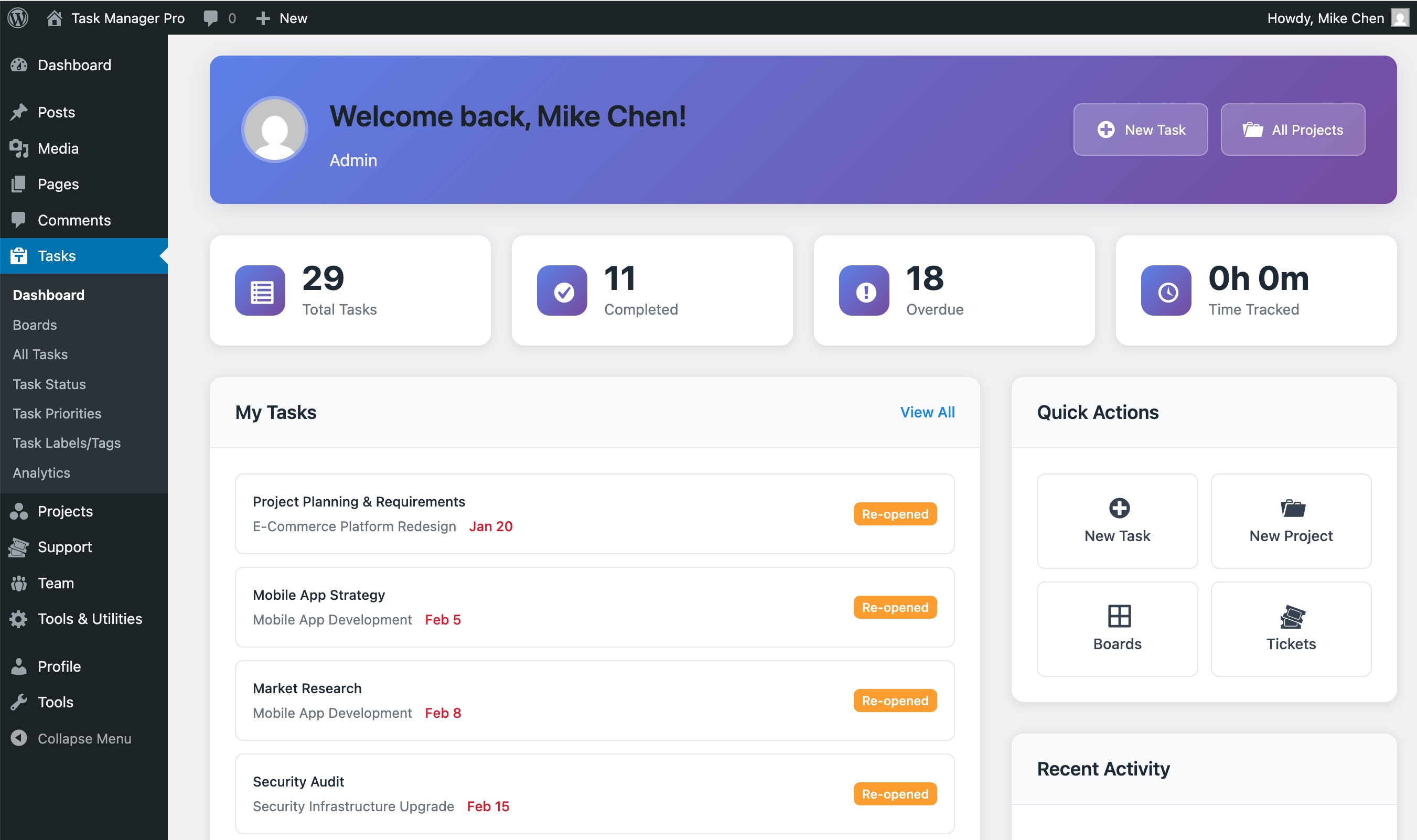
If you want to transition your agency's project management into WordPress without sacrificing speed, security, or usability, Task Manager Pro is built exactly for your workflow.
Unlike bloated alternatives, Task Manager Pro is engineered with a performance-first mindset. It provides a clean, intuitive Kanban board, integrated time tracking, and robust team collaboration tools directly inside your WordPress site—without loading unnecessary scripts on your frontend.
With Task Manager Pro, you can:
* Create secure client portals where clients can track progress and approve deliverables.
* Keep your site lightning-fast thanks to highly optimized database queries and conditional asset loading.
* Eliminate monthly subscription fees by hosting your own data with unlimited users and projects.
To ensure your server is perfectly configured to handle your new unified workflow, Softentra also offers comprehensive Performance & Security Audits to optimize your hosting environment for peak efficiency.
Stop paying the SaaS tax and bring your operations home.
Supercharge your agency's client portals with Task Manager Pro for WordPress today.
FAQs
Will running a project management plugin slow down my main agency website?
Only if the plugin is poorly coded. Bloated plugins load heavy JavaScript and CSS files on every single page of your site and abuse the default wp_posts database table. A lightweight plugin like Task Manager Pro uses conditional asset loading and optimized database queries to ensure your front-facing website remains lightning-fast.
How do I prevent clients from seeing internal team discussions and tasks?
You need a system with granular, role-based access control (RBAC). This allows you to define exactly what clients can see (such as milestones, approved deliverables, and public tasks) while keeping internal team chats, hourly logs, and draft tasks completely hidden.
Is self-hosted project management safer than SaaS platforms like Asana or Monday?
Yes, provided your server is secure. Self-hosting gives you 100% ownership of your data, eliminating the risk of third-party SaaS data breaches. By combining a secure plugin with regular server audits, you can guarantee absolute data privacy for your enterprise clients.
Supercharge your agency's client portals with Task Manager Pro for WordPress.