Self-Hosted Helpdesk Software vs SaaS: Why Growing Teams are Switching
For a growing customer support team, success is a double-edged sword. As your user base expands, you hire more agents to keep support response times low. But under the traditional Software-as-a-Service (SaaS) model, every new hire triggers a recurring financial penalty.
SaaS helpdesk platforms charge on a per-agent, per-month basis. What starts as an affordable monthly utility quickly morphs into a major line-item expense that eats into your operating margins.
If you are a support manager, customer success lead, or SaaS founder, you have likely hit this inflection point. You are forced to choose between limiting your support capacity to save money, or paying exorbitant monthly fees to keep your team staffed.
Fortunately, there is a third path: self-hosted helpdesk software. By hosting your own support platform, you decouple your team's growth from your software expenses. In this guide, we will compare self-hosted helpdesk software vs SaaS across cost, security, features, and long-term ROI to help you make an informed decision.
Key Evaluation Criteria for Helpdesk Infrastructure
Before diving into the numbers, let's establish the core criteria that support managers must evaluate when choosing between self-hosted and SaaS architectures:
- Total Cost of Ownership (TCO): Not just the upfront purchase price, but the cost of scaling the team over 12, 24, and 36 months.
- Data Sovereignty & Compliance: Where customer conversations, personally identifiable information (PII), and proprietary data reside.
- Customizability & Integration: The ability to modify the platform's codebase, integrate with internal databases, and customize the user interface without hitting API rate limits.
- Performance & Reliability: The responsiveness of the agent interface (ticket loading, search speeds) and control over system uptime.
- Operational Overhead: The internal technical resources required to deploy, update, and secure the application.
Comparison Matrix: Self-Hosted vs. SaaS Helpdesk
| Feature / Metric | SaaS Helpdesk (e.g., Zendesk, Freshdesk) | Self-Hosted Helpdesk (e.g., HelpDesk Pro) |
|---|---|---|
| Pricing Model | Recurring monthly/annual per-agent subscription | One-time lifetime license fee (unlimited agents) |
| Data Storage | Third-party multi-tenant cloud servers | Your own private cloud infrastructure (AWS, DigitalOcean) |
| Codebase Access | Closed-source; customization limited to APIs/Apps | Full access to source code (Laravel 12 + Vue 3) |
| API Rate Limits | Strict daily/hourly limits based on pricing tier | Unlimited (governed only by your server capacity) |
| AI & Automation | Expensive add-ons or usage-based token charges | Configure your own API keys (pay-as-you-go direct pricing) |
| Maintenance | Managed entirely by the SaaS vendor | Managed by your team or via professional setup services |
The Hidden Cost of Per-Agent SaaS Helpdesk Subscriptions
SaaS pricing models are designed to look accessible at entry-level tiers. A rate of $49 per agent per month sounds reasonable when you only have two or three support representatives.
However, let's look at how these costs compound as your team scales:
- The 5-Agent Team: At $49/agent/month, you pay $245/month ($2,940/year).
- The 15-Agent Team: As your customer base grows, your bill climbs to $735/month ($8,820/year).
- The 50-Agent Team: For a medium-sized support operation, you are looking at $2,450/month ($29,400/year).
This is the "scaling tax." The reward for growing your business and hiring more staff is a larger monthly bill from your software vendors.
Furthermore, SaaS providers frequently gate critical features—such as advanced ticket routing, custom roles, multi-brand support, and SLA management—behind their highest enterprise tiers. To get the features your 15-agent team actually needs, you are often forced to upgrade from a $49 tier to a $99 or $125 tier, doubling your software spend overnight.
With a self-hosted application like HelpDesk Pro, this paradigm is completely inverted. You purchase a lifetime license once. Whether you have 5 agents, 50 agents, or 500 agents, your software cost remains exactly the same: zero recurring per-agent fees.
Data Sovereignty and Security Benefits of Self-Hosting Support
Customer support tickets are a goldmine of sensitive information. Customers routinely share database IDs, billing details, proprietary system configurations, and personally identifiable information (PII) in their efforts to resolve technical issues.
When you use a SaaS helpdesk, you are handing all of this sensitive data over to a third-party processor. This introduces several challenges:
1. Compliance and Regulatory Hurdles
If your business operates in highly regulated industries (such as healthcare, fintech, or legal services) or serves customers in regions with strict data protection laws (like GDPR in Europe or CCPA in California), using a multi-tenant SaaS provider complicates your compliance strategy. You must sign complex Data Processing Agreements (DPAs) and trust that the vendor's security controls meet your legal obligations.
2. Elimination of Third-Party Data Risks
By self-hosting your helpdesk on your own virtual private servers (VPS) or private cloud (such as AWS, Google Cloud, or DigitalOcean), the data never leaves your security perimeter. You control the database encryption keys, the server firewalls, the backup retention policies, and the physical location of the data centers.
3. Direct Database Integration
Because you have direct access to the application's database, you can easily run custom SQL queries, build internal BI dashboards, or run automated data-scrubbing scripts to purge sensitive customer attachments after a ticket is closed—something that is incredibly difficult or impossible to execute on closed SaaS platforms.
Feature Parity: Self-Hosted HelpDesk Pro vs. Zendesk and Freshdesk
Historically, choosing self-hosted software meant sacrificing user experience and modern features in exchange for cost savings. Early open-source helpdesks were notoriously clunky, difficult to navigate, and lacked real-time capabilities.
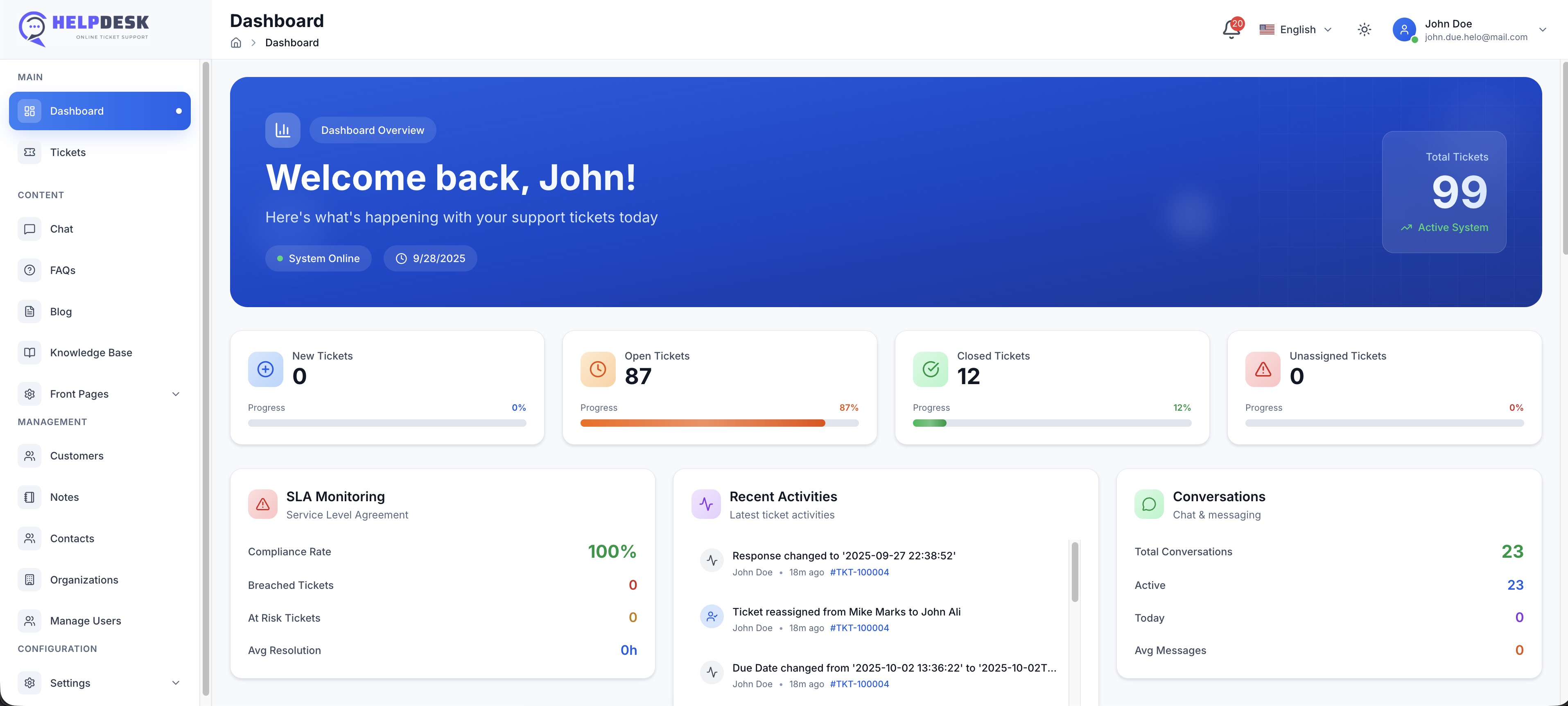
Modern self-hosted applications have closed this gap entirely. HelpDesk Pro is built on a cutting-edge stack of Laravel 12 and Vue 3, delivering a lightning-fast, reactive single-page application (SPA) experience that rivals or exceeds the usability of premium SaaS platforms.
Here is how a modern self-hosted helpdesk matches up against legacy SaaS features:
Ticket Management & Automation
HelpDesk Pro features a robust ticket management system with automated routing, custom ticket statuses, and priority levels. Using Laravel's powerful queue system, background tasks like IMAP email-to-ticket conversion run seamlessly in the background, turning incoming customer emails into organized support tickets instantly.
Real-Time Live Chat Support
Instead of paying for a separate live chat add-on, HelpDesk Pro includes integrated live chat support. Powered by Vue 3 on the frontend, your agents can chat with website visitors in real-time with zero lag, transferring chats to tickets when deeper investigation is required.
Knowledge Base & Self-Service
Deflect tickets before they reach your queue. HelpDesk Pro includes a fully customizable, SEO-friendly knowledge base. You can write, categorize, and publish help articles directly from the admin panel, allowing customers to find answers independently.
AI Ticket Classification
SaaS platforms charge premium rates for "AI features." With HelpDesk Pro, you can connect your own OpenAI or Anthropic API keys. The system uses these direct connections for AI ticket classification, sentiment analysis, and draft suggestions—allowing you to leverage cutting-edge AI at raw API cost, without SaaS markups.
Calculating Your ROI: Migration Costs vs. Long-Term SaaS Savings
Let's address the primary objection to self-hosting: "Isn't it expensive and difficult to maintain our own servers?"
While self-hosting does introduce minor infrastructure and maintenance costs, a realistic ROI calculation shows that the savings are overwhelmingly in favor of self-hosting for any team with more than five agents.
The Cost of Self-Hosting (The Realistic Breakdown)
To run a high-performance instance of HelpDesk Pro, you do not need an enterprise-grade server farm. A standard virtual private server (VPS) is highly efficient:
- Server Hosting (DigitalOcean/Linode): $12 to $20/month (for a 2-core, 4GB RAM VPS, which can easily handle 20+ active agents and thousands of daily tickets).
- Transactional Email Service (Postmark/Mailgun): $10 to $15/month (based on volume).
- S3-Compatible Backup Storage (AWS S3/Backblaze): $2/month.
- Total Infrastructure Cost: ~$35/month.
The ROI Comparison (15-Agent Team over 3 Years)
Let's compare the financial commitment of a 15-agent team over a three-year horizon:
Option A: SaaS Helpdesk ($49/agent/month)
- Year 1: $8,820
- Year 2: $8,820
- Year 3: $8,820
- Total 3-Year Spend: $26,460
Option B: Self-Hosted HelpDesk Pro
- Year 1: One-time product license fee + $420 infrastructure costs + optional setup service.
- Year 2: $420 infrastructure costs.
- Year 3: $420 infrastructure costs.
- Total 3-Year Spend: ~$1,500 - $2,000 (including license and setup)
Total Savings: Over $24,000.
These savings can be directly reinvested into hiring more support representatives, improving product quality, or boosting your marketing budget. The financial argument becomes even more dramatic if your support team grows to 30 or 50 agents.
When to Choose Each Option
To help you make the final decision, here is a straightforward breakdown of when to choose SaaS and when to make the switch to self-hosted.
Choose SaaS If:
- You have a micro-team of 1 to 2 agents and do not plan to scale.
- You have absolutely no technical capabilities or access to developer resources.
- You prefer to outsource all operational responsibility, including server uptime and maintenance, and do not mind paying a premium for it.
Choose Self-Hosted If:
- You have a growing support team (5+ agents) and want to eliminate unpredictable monthly software bills.
- You want absolute control over your customer data, conversation logs, and database backups.
- You require deep, custom integrations with your internal systems, databases, or proprietary APIs.
- You want to customize the user interface, branding, and core workflows of your helpdesk without limitations.
- You want to leverage AI ticket automation using your own API keys to avoid inflated SaaS AI pricing.
The SoftEntra Recommendation
At SoftEntra, we believe that software should be an asset, not a rent-seeking liability. When you buy a self-hosted application, you own it.
If you are ready to escape the SaaS subscription trap, we recommend HelpDesk Pro. Built on the rock-solid foundation of Laravel 12 and Vue 3, it provides your support team with a fast, modern, and intuitive interface for ticket management, live chat, and knowledge base administration—without the recurring per-agent fees.
Concerned about the initial setup? Our team is here to help. Through our Cloud & DevOps Setup and Technical Advisory services, we can handle the entire deployment process for you. We will configure the application on your preferred cloud provider, set up automated secure backups, configure your transactional email routing, and ensure your helpdesk is fully optimized for production.
Stop paying a tax on your team's growth. Take control of your customer support infrastructure, secure your data, and slash your operational costs today.
Get lifetime ownership of HelpDesk Pro and stop paying monthly per-agent SaaS fees today.
FAQs
How difficult is it to install and maintain a self-hosted helpdesk?
With modern web applications built on clean frameworks like Laravel, deployment is straightforward. You can deploy it on any standard VPS (like DigitalOcean, AWS, or Linode) using Docker or basic PHP/Nginx configurations. If you do not have in-house DevOps resources, SoftEntra offers Cloud & DevOps Setup services to handle the installation, SSL configuration, and automated backups for you.
Can a self-hosted helpdesk handle high ticket volumes?
Yes. Because HelpDesk Pro is built on Laravel 12 and Vue 3, it utilizes robust background queue processing (via Redis or database queues) to handle incoming IMAP emails, webhook events, and notifications without slowing down the user interface. A simple $10 to $20/month VPS can easily handle tens of thousands of active tickets and concurrent live chat sessions.
How do updates work with self-hosted software?
Unlike SaaS where updates are forced upon you—sometimes breaking your custom workflows—self-hosted software puts you in control. When SoftEntra releases an update for HelpDesk Pro, you can pull the latest code, run migrations in a staging environment first, and deploy to production when you are ready, ensuring zero downtime and complete stability.
Get lifetime ownership of HelpDesk Pro and stop paying monthly per-agent SaaS fees today.