Self-Hosted Project Management: Replacing Asana and Trello with ProTask
For years, cloud-based project management platforms like Asana and Trello have been the default choices for teams seeking to organize tasks, track milestones, and collaborate. However, as organizations scale, the realities of proprietary SaaS models begin to set in. What started as a free or low-cost utility quickly transforms into a significant recurring expense, accompanied by growing anxieties over data ownership, privacy compliance, and platform lock-in.
If your organization handles sensitive client data, proprietary intellectual property, or simply wants to escape the "SaaS tax" of per-user monthly billing, self-hosting is no longer a niche technical preference—it is a strategic business decision. By moving your project management infrastructure in-house, you reclaim control over your operational data while drastically reducing long-term software expenditures.
In this guide, we will explore why modern teams are migrating away from cloud-hosted project management tools, evaluate the core features required for a successful transition, and compare Asana and Trello directly with ProTask and Task Manager Pro—Softentra’s premier self-hosted project management solutions.
Why Organizations Are Pulling Project Data Back In-House
The migration from public cloud SaaS back to self-hosted environments is driven by three primary catalysts: cost predictability, data sovereignty, and deep system integration.
1. The Compounding Cost of Per-User SaaS Subscriptions
Cloud project management tools typically charge on a per-user, per-month basis. While a rate of $10 to $25 per user seems manageable for a team of five, the financial math changes dramatically as your organization grows.
Consider a mid-sized agency or development shop with 40 team members, including internal staff, external contractors, and client stakeholders who require dashboard access. At $15 per user per month, that single tool costs $600 monthly, or $7,200 annually. Over three years, you will have spent over $21,000 on a tool you do not own. With a self-hosted application like ProTask, you pay a one-time license fee and host it on your own infrastructure, instantly converting a compounding operational expense into a predictable, one-time capital investment.
2. Data Sovereignty and Compliance
When you use a cloud provider, your project roadmaps, client briefs, internal communications, and proprietary files reside on third-party servers. For agencies working under strict Non-Disclosure Agreements (NDAs), healthcare organizations bound by HIPAA, or European firms navigating GDPR compliance, this lack of direct physical control over data is a major liability.
Self-hosting allows you to deploy your project management system on your own virtual private servers (VPS) or private cloud. You control the database backups, the encryption protocols, and physical server locations, ensuring your organization remains fully compliant with internal security policies and external regulations.
3. Customizability and Database Access
Proprietary SaaS platforms lock their databases behind proprietary APIs. If you want to build custom reporting dashboards, sync project hours directly with your internal ERP, or automate database backups to an offline storage array, you are at the mercy of their API rate limits and feature tiers. With a self-hosted Laravel application like ProTask, you have direct access to the underlying MySQL database, enabling seamless integrations with your existing business tools without paying for premium "enterprise" integration tiers.
Evaluating Kanban Boards, Gantt Charts, and Time Tracking Tools
When evaluating a self-hosted alternative to Asana or Trello, you do not have to compromise on user experience or feature depth. A viable alternative must deliver the same intuitive visual interfaces that teams rely on daily, alongside robust utility tools.
Visual Task Management (Kanban & Lists)
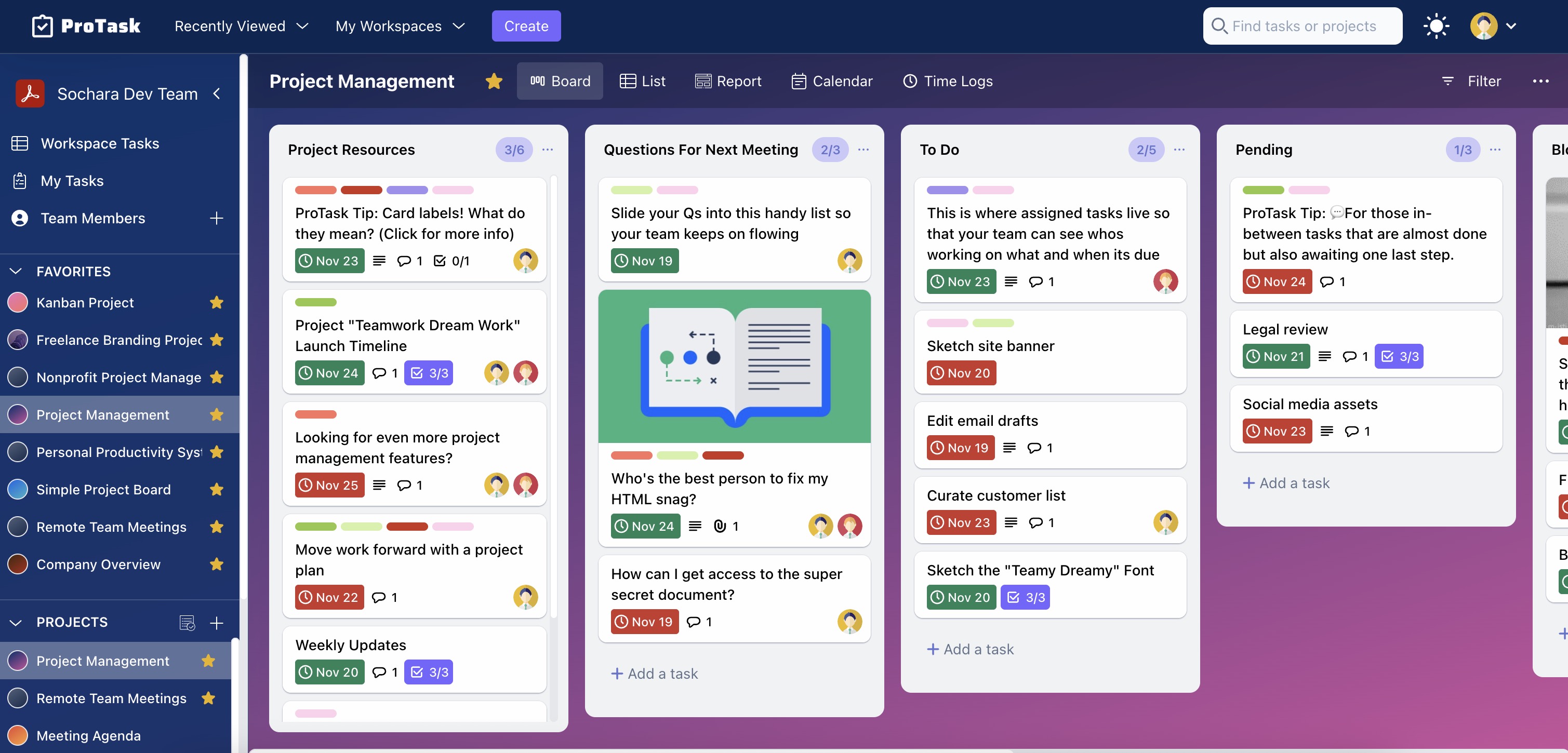
At the heart of modern project management is the ability to visualize workflows. Trello popularized the Kanban board—a system of columns and cards that represents tasks moving through stages (e.g., Backlog, In Progress, Review, Done). Asana offers a similar visual board view alongside structured list views.
Your self-hosted solution must provide highly responsive, drag-and-drop Kanban boards and structured list views. This ensures that team members can transition from SaaS tools with zero learning curve.
Time Tracking and Productivity Metrics
One of the biggest shortcomings of standard SaaS project managers is the lack of native time tracking. To track billable hours in Asana or Trello, teams are forced to purchase and integrate third-party tools like Toggl or Harvest, adding yet another layer of subscription costs and integration maintenance.
A professional-grade self-hosted tool should feature native time tracking. Team members should be able to start and stop timers directly inside a task card, allowing project managers to generate accurate timesheets, monitor budget burn rates, and analyze team productivity without leaving the application.
Collaboration and File Sharing
Project management is fundamentally collaborative. Teams need to comment on tasks, tag colleagues, assign multiple owners, and attach design assets or documentation directly to the relevant work items. The self-hosted platform must support secure file uploads, nested comment threads, and real-time notifications to keep everyone aligned.
ProTask vs. Asana vs. Trello: A Feature-by-Feature Comparison
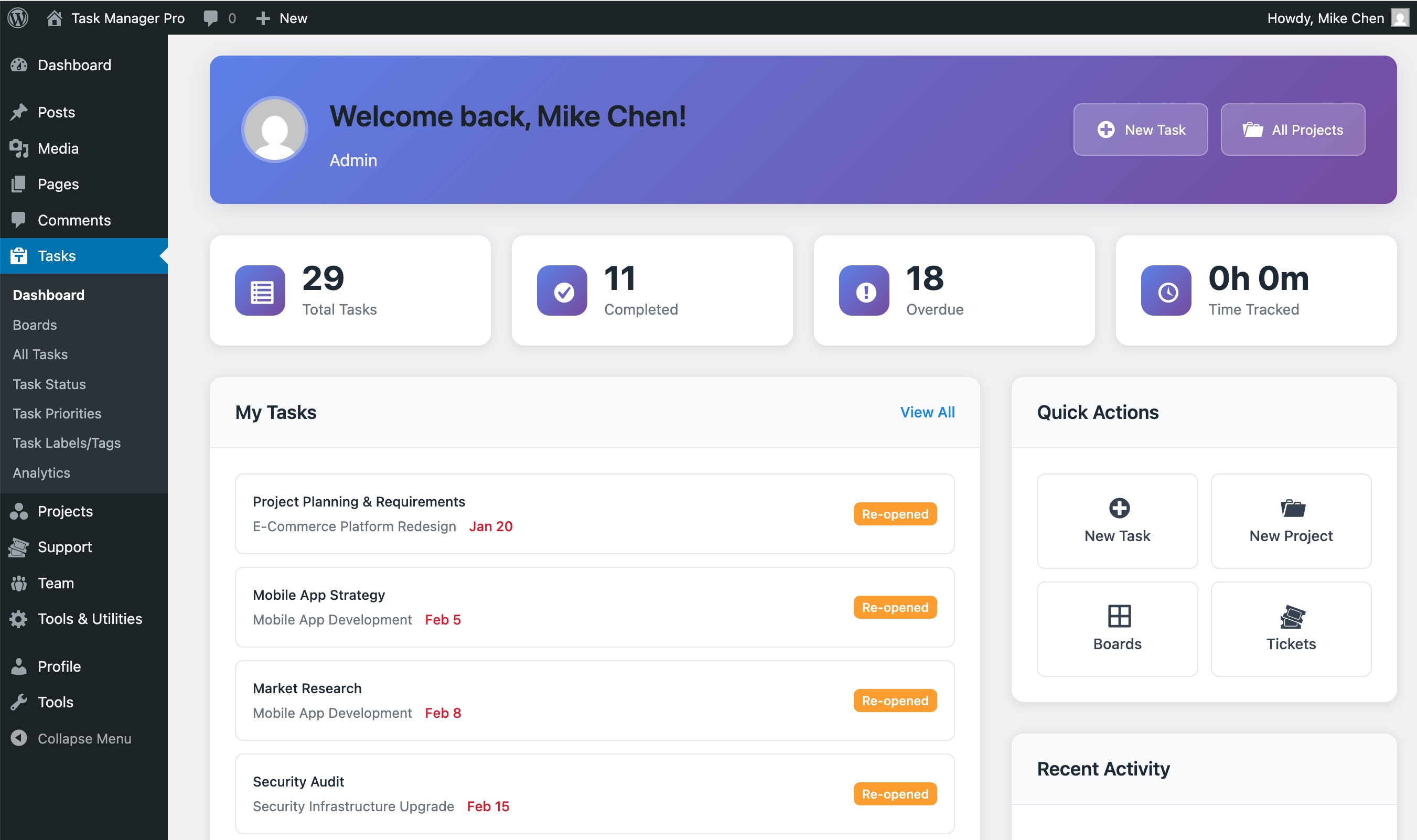
To help you determine the best fit for your organization, let’s compare the industry giants against Softentra's self-hosted offerings: ProTask (a standalone Laravel-based web application) and Task Manager Pro (a native WordPress plugin for teams operating within the WP ecosystem).
Feature Comparison Matrix
| Feature / Metric | Asana (Premium) | Trello (Premium) | ProTask (Laravel) | Task Manager Pro (WordPress) |
|---|---|---|---|---|
| Hosting Model | Cloud SaaS | Cloud SaaS | Self-Hosted (Your VPS) | Self-Hosted (Your WP Site) |
| Pricing Model | Recurring per-user/mo | Recurring per-user/mo | One-time license fee | One-time license fee |
| Data Ownership | Third-party servers | Third-party servers | 100% Private Database | 100% Private Database |
| Kanban Boards | Yes | Yes (Core focus) | Yes (Drag-and-drop) | Yes (Drag-and-drop) |
| Native Time Tracking | No (Requires integration) | No (Requires Power-Up) | Yes (Built-in timer) | Yes (Built-in timer) |
| Client Access | Paid guest accounts | Paid guest accounts | Unlimited (No extra cost) | Unlimited (No extra cost) |
| Customizability | Limited to API/UI | Limited to Power-Ups | Full source code access | Full source code access |
Deep Dive: Why ProTask is the Ideal Standalone Alternative
ProTask is engineered on the modern Laravel framework, offering a lightning-fast, secure, and highly polished user interface that rivals Asana’s aesthetic and functional depth.
- Unified Workspace: ProTask brings tasks, milestones, time tracking, and team collaboration into a single, cohesive dashboard. You do not need to stitch together multiple plugins or external services.
- No User Caps: Whether you have 5 users or 500, your licensing cost remains exactly the same. You can invite clients to view project boards, track progress, and upload assets without worrying about your monthly software bill inflating.
- Performance and Security: Built on a clean Laravel architecture, ProTask is optimized for speed. It easily handles large databases of historical tasks and files, running efficiently on standard cloud hosting environments (such as DigitalOcean, Linode, or AWS).
Deep Dive: Task Manager Pro for WordPress-Centric Teams
If your agency or business already runs its operations on WordPress, Task Manager Pro offers an incredibly streamlined path to self-hosting.
- Zero Extra Infrastructure: It installs directly as a WordPress plugin, utilizing your existing hosting environment, database, and user management systems.
- Client Portal Integration: Because it lives inside WordPress, you can easily restrict access using standard WP roles, allowing you to build a secure, white-labeled client portal where customers can log in to view project updates, submit tasks, and track billable hours.
How to Seamlessly Onboard Your Team to a Self-Hosted Project Manager
Transitioning your team away from a tool they use daily can feel daunting. However, by following a structured deployment and onboarding plan, you can minimize downtime and ensure rapid user adoption.
Step 1: Prepare Your Infrastructure
Before deploying your self-hosted application, ensure your hosting environment is optimized. For ProTask, a standard VPS running PHP 8.2+, MySQL, and Nginx is ideal. If your team lacks the internal DevOps resources to configure the server, secure SSL certificates, and set up automated database backups, Softentra’s Technical Advisory team can assist in architecting and deploying the perfect environment for your scale.
Step 2: Migrate Your Data
Do not leave your historical project data behind. Both Asana and Trello allow you to export your projects and boards into JSON or CSV formats. ProTask’s database schema is clean and well-documented, allowing you to easily map and import your existing tasks, descriptions, and user assignments directly into your new self-hosted database.
Step 3: Run a Pilot Program
Before migrating the entire company, transition a single project or department to ProTask for a two-week pilot. This allows you to fine-tune user permissions, establish workflow conventions (such as task naming and status columns), and identify power users who can help train the rest of the team.
Step 4: Highlight the Practical Benefits to Your Team
To ensure enthusiastic adoption, emphasize the features that make your team’s daily work easier:
* No more external timers: Show them how they can track time directly on their assigned tasks with a single click.
* Streamlined communication: Demonstrate how client feedback, files, and internal notes are centralized in one secure location.
* Speed: Highlight the fast page loads and responsive drag-and-drop interfaces of a dedicated Laravel application.
SoftEntra's Recommendation: Reclaiming Your Workspace
Continuing to pay exorbitant, recurring per-user fees for cloud project management is an unnecessary drain on your company's bottom line. By transitioning to a self-hosted model, you protect your proprietary data, gain complete control over your software environment, and achieve immediate, long-term cost savings.
For teams seeking a modern, standalone project management application with native time tracking and a premium user experience, we highly recommend ProTask. If your operations are already deeply integrated with WordPress, Task Manager Pro provides a seamless, powerful alternative that lives right inside your dashboard.
If you need guidance on server architecture, database migration, or choosing the right stack for your organizational needs, our Technical Advisory team is here to help you design and deploy a secure, high-performance self-hosted ecosystem.
Next Steps
Ready to break free from the SaaS subscription loop?
- Explore the full feature set of ProTask and download your self-hosted package today.
- Prefer a WordPress-integrated solution? Check out Task Manager Pro.
- Take command of your projects and team collaboration with ProTask today.
FAQs
Why should I choose a self-hosted project management tool over a cloud SaaS?
Self-hosting gives you complete ownership of your database, eliminates recurring per-user monthly subscription fees, and ensures compliance with strict data privacy regulations like GDPR or HIPAA by keeping information on your own servers.
Is ProTask difficult to install and maintain?
ProTask is built on the robust Laravel framework, making it highly standard to deploy on any modern VPS or shared hosting environment supporting PHP and MySQL. For organizations requiring assistance, Softentra offers Technical Advisory and deployment services to get you up and running smoothly.
Can I migrate my existing tasks from Trello or Asana to ProTask?
Yes. ProTask supports importing data via standard CSV structures. You can export your boards and tasks from Asana or Trello and map them directly into ProTask's database to preserve your historical project records.
Take command of your projects and team collaboration with ProTask today.