HubSpot Alternatives: The True Cost of SaaS CRM vs. Self-Hosted Solutions
For growing small and medium-sized businesses (SMBs), a Customer Relationship Management (CRM) system is the operational heartbeat of the company. It tracks deals, logs communication, schedules follow-ups, and automates outreach.
However, many founders and sales managers who start on popular SaaS platforms like HubSpot or Salesforce eventually hit a financial wall. What began as a free or $20/month starter plan quickly scales into a four-figure monthly liability as teams grow and contact lists expand.
If you are searching for an affordable self-hosted CRM HubSpot alternative, this guide breaks down the true cost of SaaS CRM systems, compares them directly with self-hosted alternatives, and introduces a self-hosted, Laravel-based solution that can save your business thousands of dollars per year.
The Scaling Tax: Why HubSpot Becomes Cost-Prohibitive as You Grow
SaaS CRMs operate on a business model designed to extract more revenue from your business as you succeed. This is often referred to as the "scaling tax." It manifests in three primary ways:
1. Per-Seat Pricing Models
If you have a sales team of three people, paying $50 to $100 per user, per month is manageable. But what happens when you hire five more reps? Or when you want to give your customer support, account management, and executive teams visibility into client histories? Suddenly, you are paying for 15 or 20 seats. On HubSpot Professional Sales Hub, this can easily exceed $1,000 per month.
2. Contact and Database Gating
SaaS platforms penalize you for building a large database. If you import cold leads or run high-volume outbound campaigns, your contact count will rise quickly. SaaS providers charge steep overage fees or force you into higher pricing tiers once you cross arbitrary thresholds (e.g., 10,000 contacts). You are essentially paying a monthly rent on your own customer data.
3. Feature Paywalls
Crucial sales enablement tools—such as automated email sequences, custom reporting dashboards, e-signatures, and multiple pipeline views—are often locked behind high-tier enterprise plans. To get a single advanced feature, you are forced to upgrade your entire subscription for all users.
SaaS CRM vs. Self-Hosted CRM: The Direct Comparison
To understand the financial and operational differences, let's compare a typical SaaS CRM deployment with a self-hosted alternative like GrowStack hosted on your own virtual private server (VPS).
| Evaluation Criteria | SaaS CRM (e.g., HubSpot / Salesforce) | Self-Hosted CRM (e.g., GrowStack) |
|---|---|---|
| Monthly Licensing Cost | $50 - $150+ per user/month | $0 (One-time software purchase) |
| Hosting & Infrastructure | Included in subscription | $10 - $40/month (Your own VPS) |
| User Limits | Hard limits; pay per seat | Unlimited users |
| Contact Limits | Tiered pricing based on database size | Unlimited contacts (limited only by disk space) |
| Data Ownership | Proprietary cloud; difficult to extract raw data | 100% Data Sovereignty (Direct SQL access) |
| Email Automation Cost | High-tier add-ons required | Low-cost SMTP integration (Amazon SES, Mailgun) |
| Customizability | Restricted to API limits and marketplace plugins | Full source code access (Laravel-based) |
What You Lose and Gain by Moving to a Self-Hosted CRM
Migrating away from a managed SaaS ecosystem is a strategic decision. To make an informed choice, you must weigh the trade-offs.
What You Gain:
- Massive Cost Savings: By eliminating monthly seat fees, the software pays for itself within the first two to three months.
- Data Privacy and Compliance: If you operate in highly regulated industries (such as healthcare, finance, or legal), storing customer data on third-party SaaS servers can pose compliance risks. With a self-hosted CRM, the database lives on your secure servers, making GDPR, CCPA, or HIPAA compliance easier to manage.
- No Feature Gating: You get access to every feature—including pipeline tracking, email sequences, and contract e-signatures—from day one, for all users.
- Direct Database Control: Need to run custom business intelligence reports or sync your CRM with an internal inventory system? With self-hosting, you have direct read/write access to the database, bypassing restrictive SaaS API rate limits.
What You Lose (and How to Mitigate It):
- Server Maintenance: You are responsible for keeping the server online and secure. Mitigation: Modern hosting tools like Laravel Forge, Ploi, or RunCloud automate server updates, SSL renewals, and backups with a single click. Alternatively, you can leverage SoftEntra's Technical Advisory services to handle the initial architecture and deployment.
- Out-of-the-Box Integrations: SaaS platforms have massive app stores. Mitigation: Self-hosted applications built on modern frameworks like Laravel can easily connect to thousands of external tools using webhooks or automation platforms like Zapier and Make.
Feature Breakdown: GrowStack's Pipeline, Lead, and Sequence Management
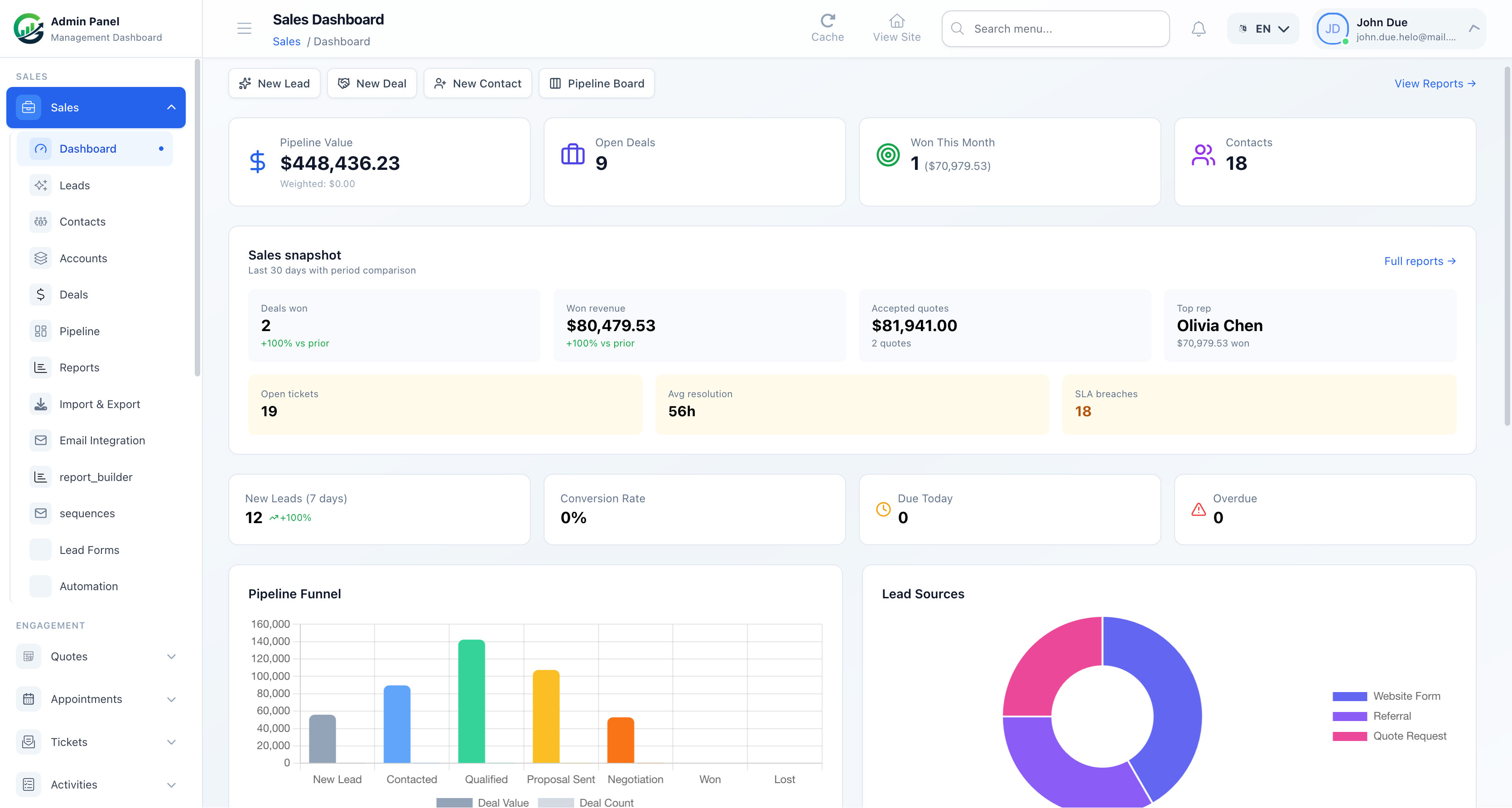
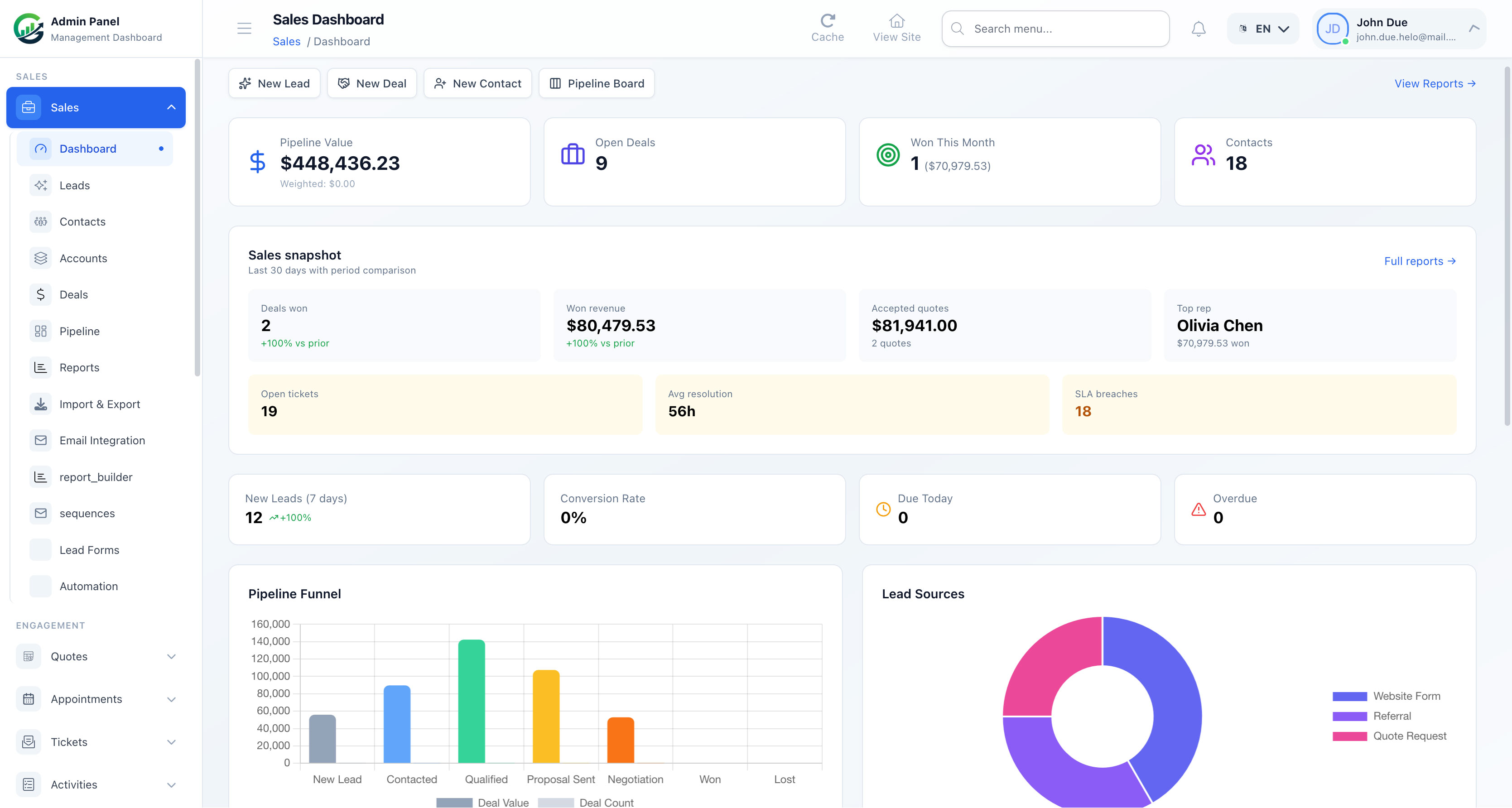
GrowStack is a self-hosted CRM built on the robust Laravel framework, designed specifically for SMB owners who need enterprise-grade sales tools without the enterprise price tag.
+-----------------------------------------------------------------+
|                         YOUR VPS SERVER                         |
|                                                                 |
|  +------------------+  +------------------+  +---------------+  |
|  |   GrowStack UI   |  |  Email Sequences |  |  E-Signatures |  |
|  |  (Sales Funnel)  |  |   (SMTP Relay)   |  |  (Contracts)  |  |
|  +--------+---------+  +--------+---------+  +-------+-------+  |
|           |                     |                    |          |
|           +---------------------+--------------------+          |
|                                 |                               |
|                      +----------v----------+                    |
|                      |  Secure MySQL DB    |                    |
|                      |  (100% Owned by You)|                    |
|                      +---------------------+                    |
+-----------------------------------------------------------------+
Here is how GrowStack replaces the core functionality of expensive SaaS platforms:
Visual Sales Pipelines
Track deals across customizable stages using an intuitive drag-and-drop Kanban board. Sales managers can view the health of the entire sales pipeline, estimate monthly revenue, and identify bottlenecks in real-time.
Automated Email Sequences
One of the most expensive features on SaaS platforms is automated outreach. GrowStack includes built-in crm with email sequences capability. You can design automated multi-step email campaigns for lead nurturing or cold outreach. By routing these emails through low-cost SMTP providers like Amazon SES (which costs $0.10 per 1,000 emails), you can run high-volume campaigns for pennies.
Contact & Lead Management
Keep a detailed timeline of every interaction with a prospect. Log notes, schedule tasks, track email opens, and store documents in one centralized, self-hosted repository.
Integrated Contracts & E-Signatures
Instead of paying for a separate DocuSign or HelloSign subscription, GrowStack allows you to generate contracts, send them to clients, and collect legally binding e-signatures directly inside your CRM workflow.
A Step-by-Step Migration Plan from SaaS CRM to Your Own Server
Migrating your sales operations may seem daunting, but breaking it down into structured phases ensures zero downtime and complete data preservation.
Phase 1: Clean and Export Your Data
Before exporting, clean up your current CRM. Delete duplicate leads, archive closed-lost deals from years ago, and standardize your contact fields. Once clean, export your contacts, companies, and deals into standard CSV files.
Phase 2: Set Up Your Hosting Environment
Purchase a VPS from a reliable cloud provider (such as DigitalOcean, Hetzner, or Vultr). A basic $10 to $20/month server is more than enough to run GrowStack smoothly for teams of up to 50 users. Install a server management panel or use a clean Ubuntu server to host the Laravel application.
Phase 3: Install GrowStack and Configure SMTP
Upload the GrowStack codebase to your server. Run the quick installation wizard to set up your database and admin account. Next, connect your transactional email provider (e.g., Mailgun or Postmark) to handle system notifications and outbound email sequences.
Phase 4: Import Data and Map Fields
Use GrowStack's built-in import tool to upload your CSV files. Map your legacy SaaS fields (e.g., "First Name", "Email", "Deal Stage") to the corresponding fields in GrowStack. Run a small test import of 10-20 records to verify that timelines, notes, and contact relationships are preserved correctly.
Phase 5: Team Onboarding and Go-Live
Invite your sales team to the platform. Because GrowStack features a clean, modern user interface, the learning curve is minimal. Once your team is comfortable, disconnect your legacy SaaS subscription to stop the recurring billing cycle immediately.
Take Control of Your Sales Stack with SoftEntra
Continuing to pay per-seat SaaS fees is an unnecessary drain on your business's bottom line. By transitioning to a self-hosted CRM, you regain control over your customer data, eliminate artificial growth limits, and significantly reduce your monthly software spend.
At SoftEntra, we specialize in providing high-quality, self-hosted web applications and scripts that empower businesses to own their technology. If you need assistance planning your server architecture, evaluating your stack, or managing the migration, our Technical Advisory team is here to help you every step of the way.
Ready to eliminate monthly CRM fees? Switch to GrowStack today and deploy a powerful, self-hosted CRM on your own terms.
FAQs
How much technical knowledge is required to run a self-hosted CRM like GrowStack?
GrowStack is built on Laravel, making it highly standard and easy to deploy. If you can set up a basic VPS on DigitalOcean, Linode, or AWS using a tool like Laravel Forge or Ploi, you can run GrowStack. For businesses without in-house DevOps, SoftEntra offers Technical Advisory and deployment services to handle the setup for you.
Can I send automated email sequences from a self-hosted CRM?
Yes. GrowStack supports robust email sequence automation. By connecting your own SMTP provider (such as Amazon SES, Mailgun, or Postmark), you can send thousands of automated cold and warm outreach emails for a fraction of a cent per email, completely bypassing the expensive marketing contact limits imposed by SaaS CRMs.
What happens when my sales team grows on a self-hosted CRM?
Unlike SaaS platforms that charge you per user seat, a self-hosted CRM allows you to add unlimited users, contacts, and pipelines at no extra cost. Your only scaling cost is the underlying VPS hardware, which typically only needs a minor upgrade ($5 to $10 more per month) to handle hundreds of concurrent users.
Switch to GrowStack today for a self-hosted CRM with zero monthly seat fees.