Taming Calendar Chaos: How to Build a Custom Booking Funnel That Converts
For service-based businesses, time is the ultimate currency. Yet, many business owners spend hours every week playing calendar tag. The typical back-and-forth email chain—"Are you free Tuesday at 2 PM? No, how about Thursday at 10 AM?"—is more than just an administrative headache. It is a silent killer of conversions.
Every friction point in your booking process gives a prospective client time to reconsider, look at a competitor, or simply forget about the meeting altogether. To scale your operations and maximize your revenue, you need a streamlined, automated booking funnel.
If you are looking for the best self hosted booking software to replace calendly for business, this guide will walk you through the mechanics of building a high-converting, self-hosted booking funnel that keeps you in control of your data, your brand, and your revenue.
Why Your Current Back-and-Forth Email Booking Flow is Costing You Clients
When a prospect decides they want to speak with you, their buying intent is at its peak. If they have to wait hours for you to reply to an email with availability, that momentum is lost.
The Friction Multiplier
Consider the typical manual booking journey:
1. Lead submits a contact form on your website.
2. You reply 4 hours later with three potential time slots.
3. The lead checks their calendar the next morning, but two of your slots are now taken by other clients. They reply asking for alternative times.
4. You reply with new times another 6 hours later.
5. The lead finally confirms, but the meeting is scheduled for next week instead of tomorrow.
By the time the meeting occurs, the lead's urgency has cooled. In worst-case scenarios, they have already booked with a competitor who offered an instant online scheduling option.
The Cost of SaaS Middlemen
To solve this, many businesses turn to SaaS tools like Calendly or Acuity. While these platforms solve the scheduling problem, they introduce new challenges for growing businesses:
* Subscription Creep: Paying $15 to $25 per user, per month adds up quickly as your team grows.
* Loss of Brand Control: Your clients are redirected to a third-party domain, weakening your brand consistency.
* Data Privacy Concerns: Your client database, contact information, and meeting notes are stored on external servers, which can be a compliance risk for industries handling sensitive information.
Transitioning to a self hosted booking system for small business eliminates these recurring costs while keeping your client data securely on your own servers.
Designing a High-Converting Online Booking Landing Page
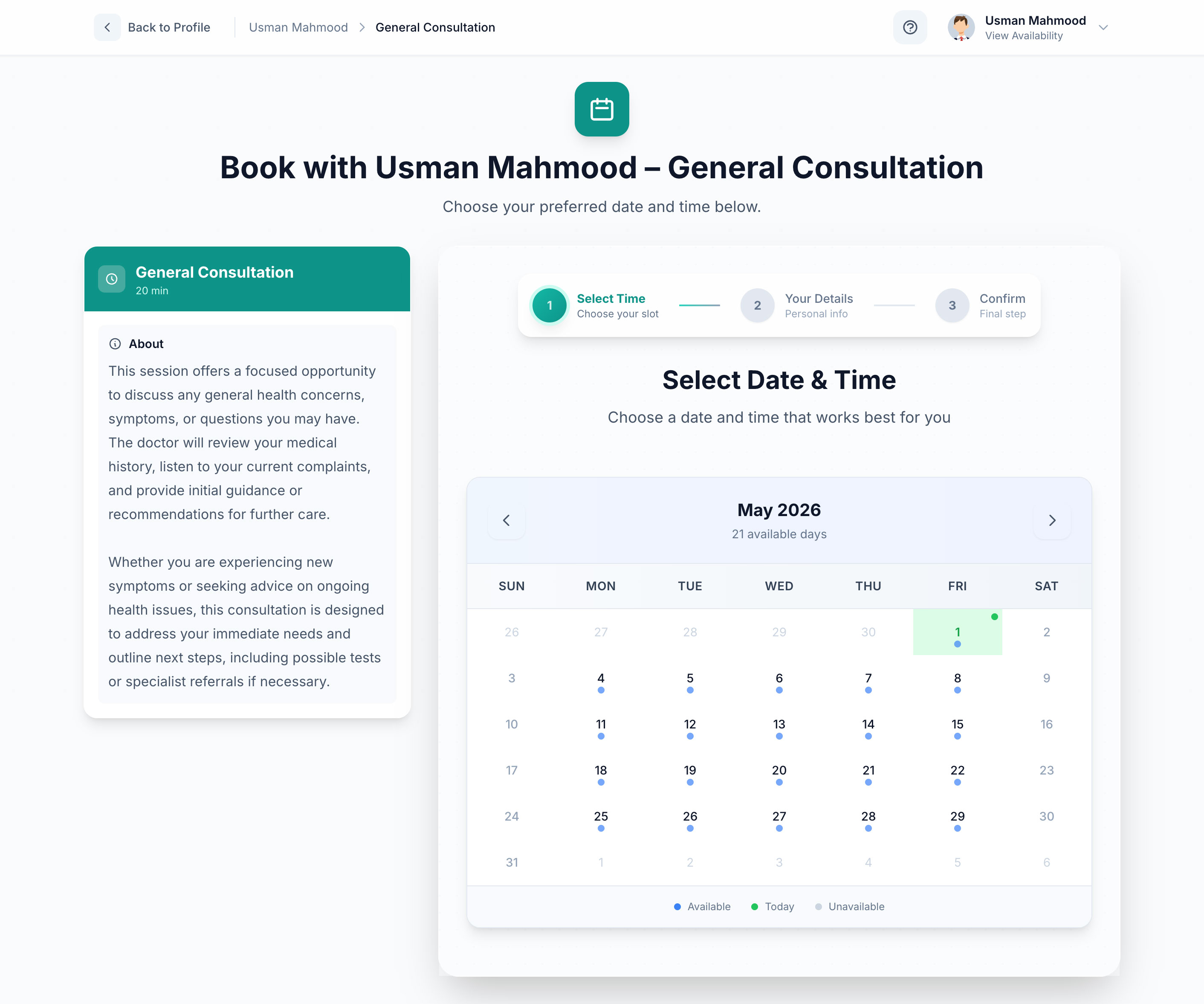
An effective booking funnel is not just a calendar grid slapped onto a blank page. It is a landing page designed to guide the user toward a single, clear action: securing their slot.
To maximize conversions, your booking page should incorporate several key design principles:
1. Reduce Cognitive Load
Do not overwhelm users with too many choices on a single screen. Break the booking process down into logical, bite-sized steps:
* Step 1: Select the service or meeting type.
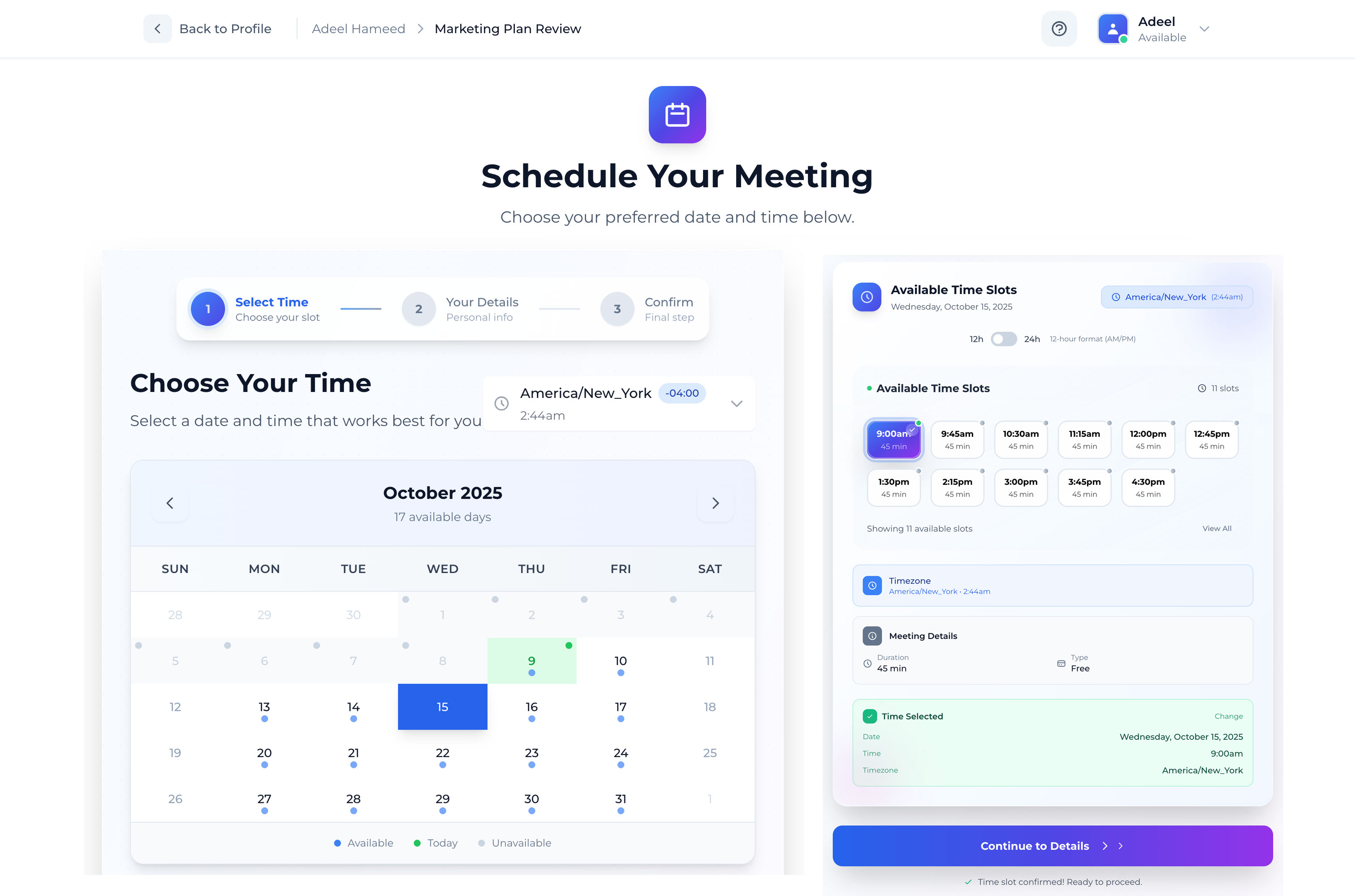
* Step 2: Choose a date and time.
* Step 3: Enter contact details and answer qualifying questions.
* Step 4: Complete payment (if applicable) and confirm.
2. Mobile-First Layout
Over 50% of web traffic originates from mobile devices. If your booking calendar is difficult to navigate on a smartphone screen, your conversion rate will plummet. Ensure your calendar grid, time slots, and form fields are large enough to be easily tapped with a thumb.
3. Clear Value Proposition
Before the user even looks at the calendar, remind them why they are booking this call. Include a concise headline, 2-3 bullet points outlining what they will get from the session, and social proof (such as a quick testimonial or client logo strip) directly on the booking page.
4. Minimal Form Fields
Only ask for the information you absolutely need to prepare for the meeting. Every additional form field you add can decrease conversions by up to 10%. If you need deep background information, send a post-booking intake questionnaire instead of crowding the initial booking form.
Need help crafting a flawless user experience? SoftEntra's Custom UI/UX Design service can help you design a bespoke booking interface tailored specifically to your target audience's behavior.
Handling Real-Time Availability Sync and Double-Booking Prevention
There is nothing more unprofessional than having to email a client to reschedule because your automated system double-booked you. A reliable booking funnel must handle real-time availability checks flawlessly.
[Client Views Booking Page]
       │
       ▼
[System Queries Local Database & External Calendars (Google/Outlook)]
       │
       ▼
[Filters Out Blocked Times & Existing Appointments]
       │
       ▼
[Displays Only True Available Slots to Client]
How Real-Time Sync Works
To prevent scheduling conflicts, your self-hosted booking system needs to communicate directly with your primary calendar (e.g., Google Calendar, Microsoft Outlook, or Apple Calendar) via APIs.
When a user loads your booking page, the system should:
1. Query your local database for existing bookings.
2. Query your external calendar API for any personal appointments or blocked-out times.
3. Merge these datasets to calculate your true availability.
4. Display only the open slots to the user.
This process must happen in milliseconds. If the API queries are slow, your page load time will suffer, leading to user abandonment. A robust self-hosted application built on a high-performance framework like Laravel handles these database queries and API calls efficiently, caching availability data where appropriate to ensure lightning-fast load times.
Integrating Stripe and PayPal Directly into Your Booking Funnel
If you run a consulting, coaching, or professional services business, booking an appointment is only half the battle. You also need to secure payment.
Allowing clients to book a slot without paying upfront often leads to high no-show rates. By integrating payment gateways directly into your booking funnel, you qualify your leads and guarantee revenue before you ever jump on a call.
Benefits of Integrated Payments
- Drastically Reduced No-Shows: Clients who pay for a session are highly motivated to show up on time.
- Automated Invoicing: No need to manually generate and send invoices after the meeting.
- Flexible Pricing Models: You can offer free introductory calls, fixed-price consultations, or require a non-refundable deposit to secure a slot.
Implementing Secure Gateways
When self-hosting your booking system, you should never store credit card details on your own database. Instead, use secure, tokenized payment integrations like Stripe and PayPal.
With Stripe, for example, the payment form is rendered securely via Stripe Elements. The sensitive card data goes directly to Stripe's secure servers, and your self-hosted system receives a secure token confirming the payment was successful. Once the token is verified, the booking is finalized and written to your database.
Checklist: Is Your Booking Funnel Ready for High-Volume Traffic?
Before launching your new booking funnel to your email list or ad campaigns, run through this quick checklist to ensure a seamless launch:
- [ ] Time Zone Auto-Detection: Does the calendar automatically detect and display slots in the user's local time zone?
- [ ] Buffer Times: Have you configured buffer times (e.g., 15 minutes) before and after appointments so you have time to take notes and rest?
- [ ] Automated Email Confirmations: Do both you and the client receive an immediate email confirmation with the meeting details and a calendar invite file (.ics)?
- [ ] SMS/Email Reminders: Are automated reminders scheduled to go out 24 hours and 1 hour before the meeting to prevent no-shows?
- [ ] Cancellation/Rescheduling Policy: Is there a clear link in the confirmation email allowing clients to reschedule or cancel within your allowed timeframe (e.g., up to 24 hours before)?
- [ ] Mobile Responsiveness: Have you tested the entire booking and payment flow on both iOS and Android devices?
The Self-Hosted Solution: Why ProSchedule is the Ultimate Calendly Alternative
Building a custom booking system from scratch can take weeks of development time and thousands of dollars. Fortunately, you don't have to reinvent the wheel.
ProSchedule is a premium, self-hosted web application built on the powerful Laravel framework. It provides small businesses, consultants, and service providers with a robust, white-label scheduling platform that replaces expensive SaaS tools.
Key Features of ProSchedule:
- 100% Data Ownership: Host the application on your own server. Your client data, booking history, and business metrics remain entirely yours.
- No Monthly Per-User Fees: Pay once for the software and use it for your entire team without worrying about scaling subscription costs.
- Seamless Payment Integrations: Built-in support for Stripe and PayPal allows you to accept paid appointments out of the box.
- Real-Time Calendar Sync: Prevent double-bookings with reliable, automated calendar synchronization.
- Fully Customizable: Because ProSchedule is built on Laravel, you have complete access to the source code, allowing you to customize the booking flow, add custom fields, or integrate it with your existing CRM and internal tools.
Elevate Your Booking Experience with Custom UI/UX Design
While ProSchedule comes with a clean, professional interface out of the box, every business has unique branding requirements. To truly stand out from your competitors, you can leverage SoftEntra's Custom UI/UX Design services. Our team of expert designers can craft a bespoke frontend for your ProSchedule installation, matching your exact brand guidelines and optimizing the user journey to maximize conversion rates.
Frequently Asked Questions
How difficult is it to install a self-hosted booking system like ProSchedule?
If you have basic web hosting experience, installing ProSchedule is straightforward. It follows standard Laravel installation procedures. If you prefer a hands-off approach, SoftEntra offers installation and deployment services to get your booking system up and running on your server in no time.
Can I set up different meeting types and durations?
Yes. ProSchedule allows you to create unlimited appointment types with different durations, pricing, buffer times, and availability windows. You can set up a 15-minute free discovery call, a 60-minute paid strategy session, and a multi-hour workshop all within the same system.
Will a self-hosted booking system work on my existing WordPress or HTML website?
Absolutely. You can host ProSchedule on a subdomain (e.g., booking.yourdomain.com) and easily link to it or embed it directly into your existing website pages using simple iframe codes or custom buttons.
Take Control of Your Schedule Today
Stop letting manual scheduling friction turn hot leads into cold prospects. By implementing a self-hosted booking funnel, you provide a seamless, professional experience for your clients while reclaiming hours of administrative time every week.
Ready to eliminate calendar chaos and take control of your booking data?
Streamline your booking flow and start accepting paid appointments with ProSchedule today.
FAQs
Why should I choose a self-hosted booking system over SaaS alternatives like Calendly?
A self-hosted booking system like ProSchedule gives you 100% data ownership, eliminates monthly subscription fees per user, and allows you to fully customize the booking flow and branding to match your business identity without third-party limitations.
How does ProSchedule prevent double-bookings across multiple calendars?
ProSchedule features real-time availability synchronization. It checks your connected calendars (such as Google Calendar or Outlook) before displaying open slots to clients, ensuring that once a slot is booked, it is instantly blocked across all channels.
Can I accept payments directly through my self-hosted booking funnel?
Yes. ProSchedule integrates directly with payment gateways like Stripe and PayPal. This allows you to require full or partial deposit payments at the exact moment a client books an appointment, reducing no-shows and securing revenue upfront.
Streamline your booking flow and start accepting paid appointments with ProSchedule today.