How We Architected an AI Ticket Classification System in Laravel 12
As a SaaS founder, scaling your customer support without linearly scaling your support team is one of the hardest operational challenges you will face. When we set out to build HelpDesk Pro, our self-hosted customer support platform, we knew that manual ticket triage was the primary bottleneck. Support agents spend up to 20% of their time reading, categorizing, and routing tickets to the right departments.
To solve this, we architected an automated, AI-driven ticket classification system directly into the core of HelpDesk Pro. By leveraging the modern features of Laravel 12 on the backend and a reactive Vue 3 frontend, we built a system that classifies incoming tickets in real-time, routes them to the correct agent, and suggests macro responses—all within seconds of the ticket hitting the database.
In this engineering story, we will pull back the curtain on how we designed this architecture, the code that powers it, and how we optimized it for production latency and cost.
The Problem: Manual Ticket Categorization Clogs Support Pipelines
In high-volume support environments, manual categorization is a silent killer of Support Level Agreements (SLAs). When a ticket arrives via email (IMAP) or a web form, it typically sits in a general queue until a human agent reviews it, assigns a category (e.g., "Billing", "Technical Bug", "Feature Request"), sets a priority, and routes it to the specialized team.
This manual process introduces several critical failure points:
- Triage Latency: Tickets can sit unassigned for hours, increasing the overall Time to First Response (TTFR).
- Human Error: Tired agents frequently misclassify tickets, leading to internal bouncing between departments.
- Inflexible Routing: Simple keyword-based rules (e.g., matching "refund" to "Billing") fail when a user writes: "I don't want a refund, but I need to update my billing card."
We needed an intelligent classifier that understood semantic intent, worked asynchronously to keep the user experience snappy, and updated the agent dashboard in real-time without requiring browser refreshes.
Architecture/Approach: Integrating AI Models with Laravel 12's Native Features
Our architecture relies on a decoupled, event-driven pipeline. We chose Laravel 12 because of its robust queue management, native concurrency utilities, and clean integration patterns.
Here is how the data flows:
- Ingestion: A ticket is created via the API or IMAP fetcher.
- Dispatch: A
ClassifyTicketWithAijob is pushed to a Redis-backed queue. - AI Processing: The job sanitizes the ticket body, constructs a structured prompt, and calls the LLM API.
- Persistence: The job parses the structured JSON response, updates the ticket's category, priority, and tags, and saves it.
- Broadcasting: A
TicketClassifiedevent is broadcasted over WebSockets.
Let's look at the core Laravel 12 Job implementation:
namespace App\Jobs;

use App\Models\Ticket;
use App\Events\TicketClassified;
use Illuminate\Bus\Queueable;
use Illuminate\Contracts\Queue\ShouldQueue;
use Illuminate\Foundation\Bus\Dispatchable;
use Illuminate\Queue\InteractsWithQueue;
use Illuminate\Queue\SerializesModels;
use Illuminate\Support\Facades\Http;
use Illuminate\Support\Facades\Log;

class ClassifyTicketWithAi implements ShouldQueue
{
    use Dispatchable, InteractsWithQueue, Queueable, SerializesModels;

    public $tries = 3;
    public $backoff = [5, 10, 20];

    public function __construct(protected Ticket $ticket) {}

    public function handle(): void
    {
        // Strip HTML and limit token usage
        $sanitizedBody = substr(strip_tags($this->ticket->body), 0, 1500);

        $response = Http::withToken(config('services.openai.key'))
            ->post('https://api.openai.com/v1/chat/completions', [
                'model' => 'gpt-4o-mini',
                'response_format' => ['type' => 'json_object'],
                'messages' => [
                    [
                        'role' => 'system',
                        'content' => "You are an expert support triage assistant. Analyze the ticket and return a JSON object with keys: 'category' (Billing, Technical, Account, Sales), 'priority' (low, medium, high), and 'confidence' (0.0 to 1.0)."
                    ],
                    [
                        'role' => 'user',
                        'content' => "Ticket Subject: {$this->ticket->subject}\n\nBody: {$sanitizedBody}"
                    ]
                ]
            ]);

        if ($response->failed()) {
            throw new \Exception('AI Classification API failed: ' . $response->body());
        }

        $data = json_decode($response->json('choices.0.message.content'), true);

        if ($data && $data['confidence'] >= 0.7) {
            $this->ticket->update([
                'category' => $data['category'],
                'priority' => $data['priority'],
                'ai_classified' => true,
                'ai_metadata' => $data
            ]);

            event(new TicketClassified($this->ticket));
        } else {
            Log::warning("AI classification confidence too low for Ticket #{$this->ticket->id}");
        }
    }
}
By pushing this to the queue, we ensure that the customer submitting the ticket experiences zero delay. The classification happens in the background, typically completing in under 1.5 seconds.
Building a Real-Time Vue 3 Frontend for AI Ticket Insights
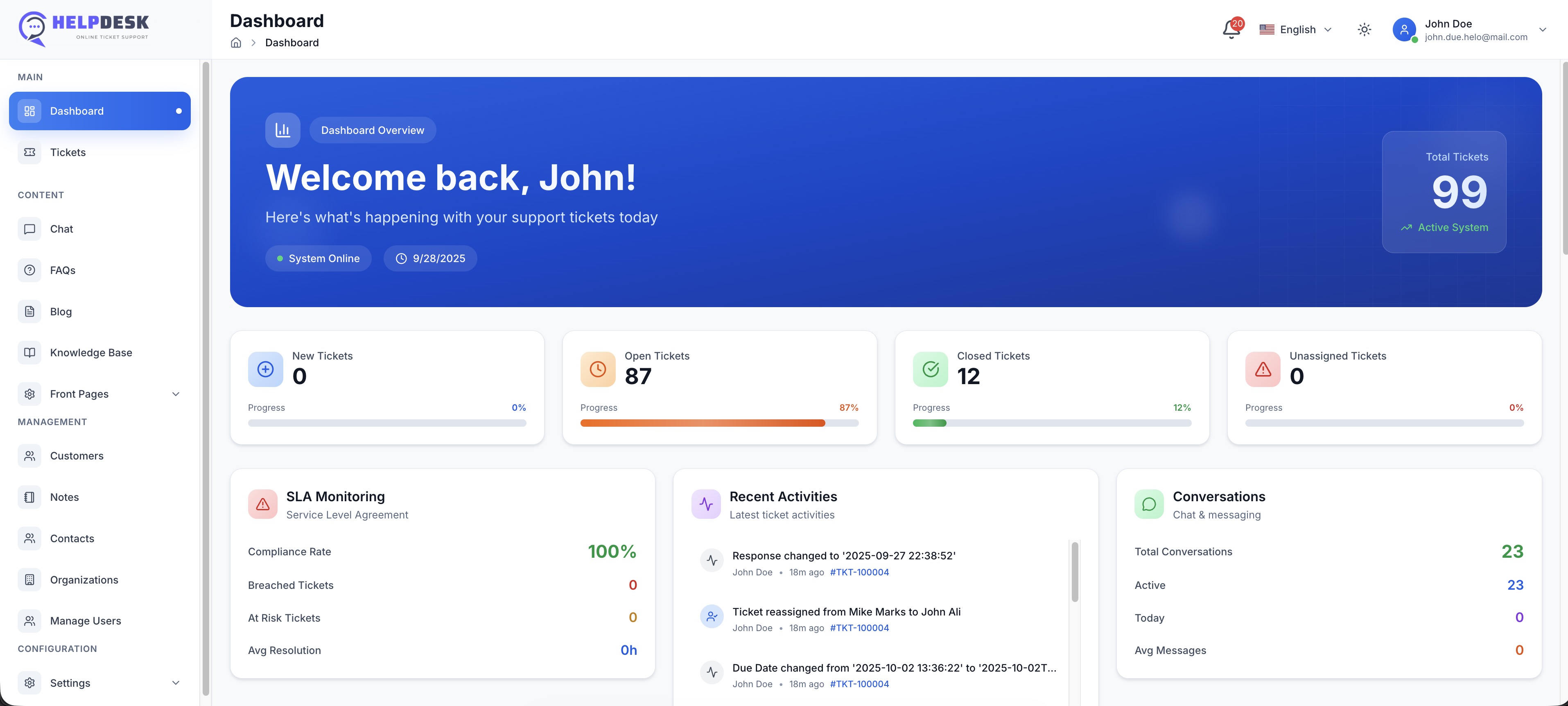
Once the backend queue processes the classification, we must update the support agent's dashboard instantly. We built the frontend of HelpDesk Pro using Vue 3 and Tailwind CSS, communicating with Laravel via Laravel Echo and WebSockets.
When an agent is viewing the open tickets queue, they see the classification update dynamically without manual page reloads. Here is the Vue 3 component logic that handles this real-time update:
<template>
  <div class="p-4 bg-white shadow rounded-lg border border-gray-100">
    <h3 class="text-lg font-semibold text-gray-900">Active Tickets</h3>
    <ul class="divide-y divide-gray-200 mt-4">
      <li v-for="ticket in tickets" :key="ticket.id" class="py-3 flex justify-between items-center">
        <div>
          <p class="text-sm font-medium text-gray-800">{{ ticket.subject }}</p>
          <span class="text-xs text-gray-500">From: {{ ticket.user_email }}</span>
        </div>
        <div class="flex items-center space-x-2">
          <span v-if="ticket.ai_classified" class="inline-flex items-center px-2.5 py-0.5 rounded-full text-xs font-medium bg-green-100 text-green-800">
            AI: {{ ticket.category }}
          </span>
          <span v-else class="inline-flex items-center px-2.5 py-0.5 rounded-full text-xs font-medium bg-gray-100 text-gray-800">
            Classifying...
          </span>
          <span :class="priorityClass(ticket.priority)" class="inline-flex items-center px-2.5 py-0.5 rounded-full text-xs font-medium">
            {{ ticket.priority || 'Pending' }}
          </span>
        </div>
      </li>
    </ul>
  </div>
</template>

<script setup>
import { ref, onMounted, onUnmounted } from 'vue';
import Echo from 'laravel-echo';
import Pusher from 'pusher-js';

window.Pusher = Pusher;
const echo = new Echo({
    broadcaster: 'reverb',
    key: import.meta.env.VITE_REVERB_APP_KEY,
    wsHost: import.meta.env.VITE_REVERB_HOST,
    wsPort: import.meta.env.VITE_REVERB_PORT ?? 80,
    forceTLS: false,
    enabledTransports: ['ws', 'wss'],
});

const tickets = ref([]);

const priorityClass = (priority) => {
  if (priority === 'high') return 'bg-red-100 text-red-800';
  if (priority === 'medium') return 'bg-yellow-100 text-yellow-800';
  return 'bg-blue-100 text-blue-800';
};

onMounted(() => {
  // Fetch initial tickets via API
  fetch('/api/tickets')
    .then(res => res.json())
    .then(data => tickets.value = data);

  // Listen for real-time AI classification updates
  echo.channel('tickets')
    .listen('TicketClassified', (e) => {
      const index = tickets.value.findIndex(t => t.id === e.ticket.id);
      if (index !== -1) {
        tickets.value[index] = e.ticket;
      }
    });
});

onUnmounted(() => {
  echo.leaveChannel('tickets');
});
</script>
This reactive UI ensures that support managers see incoming traffic routed instantly, allowing them to focus on high-priority issues without administrative overhead.
Tradeoffs & Optimization: How We Optimized Prompt Latency and API Costs for Production
When deploying AI features in production, SaaS founders often run into two major roadblocks: high API costs and slow response times. During our development of HelpDesk Pro, we made several architectural trade-offs to keep the system fast and cost-effective:
1. Model Selection Tiering
We initially tested GPT-4, but found it was too slow (3-5 seconds latency) and expensive for high-volume support. We switched to gpt-4o-mini as our primary classifier. It offers sub-second response times and is over 90% cheaper, with no noticeable drop in classification accuracy for this specific task.
2. Token Minimization
Ticket bodies often contain long email signatures, HTML markup, and historical reply chains. Sending this raw data to an LLM wastes thousands of tokens. We implemented a parser that strips HTML, discards historical email replies, and truncates the body to the first 1,500 characters. This reduced our average token usage per ticket by 65%.
3. JSON Schema Enforcement
LLMs can occasionally return malformed JSON, causing parsing exceptions. By using OpenAI's response_format: { type: "json_object" } and strict system prompts, we guaranteed valid JSON payloads, eliminating the need for expensive retry logic.
4. Local Fallbacks
For highly repetitive tickets (e.g., "How do I reset my password?"), we implemented a lightweight local keyword and regex pre-filter. If a ticket matches a highly specific pattern, it bypasses the AI queue entirely, saving API costs and reducing processing time to milliseconds.
Lessons Learned & SoftEntra Product Context
Architecting an enterprise-grade AI ticket classification system requires balancing backend queue stability, real-time frontend reactivity, and cost-efficient API usage.
If you are building a SaaS or managing a growing customer support team, you don't have to spend weeks of engineering time writing this pipeline from scratch. We have packaged this exact production-ready architecture into HelpDesk Pro, our self-hosted helpdesk and customer support application. Built on Laravel 12 and Vue 3, HelpDesk Pro gives you complete control over your data, zero monthly per-seat SaaS fees, and built-in AI ticket classification out of the box.
For teams requiring custom integrations, proprietary LLM connections, or bespoke workflow automation, Softentra also offers professional Laravel Development and Frontend Engineering services to tailor our applications to your exact business needs.
FAQs
Which AI models does HelpDesk Pro support?
HelpDesk Pro supports OpenAI models (like GPT-4o and GPT-4o-mini) out of the box, and can be easily extended to support Anthropic Claude, local Ollama instances, or any custom LLM API via its driver-based architecture.
How does the system handle high-volume ticket spikes without hitting API rate limits?
We utilize Laravel 12's native queue rate limiting and job backoff configurations. If the OpenAI API returns a rate-limit error, the job is automatically released back to the Redis queue with an exponential backoff delay, ensuring no tickets are lost.
Can we run this completely on-premise with open-source LLMs?
Yes. Because HelpDesk Pro is self-hosted, you can modify the API endpoint in the configuration to point to a local LLM gateway (like Ollama or Llama.cpp) running open-source models like Llama 3 or Mistral, keeping your customer data entirely within your own infrastructure.
Buy HelpDesk Pro to instantly deploy automated, AI-driven customer support.